Cookies

Your privacy, clearly explained

We use cookies to keep LinkDirect secure, improve performance, and understand how people use the product.

Back to blog

How to Open Facebook Links in an External Browser Instead of the In-App Browser

Facebook’s in-app browser can separate the original affiliate click from the browser in which the customer later completes a purchase. Learn how this affects cookies and attribution, and how LinkDirect helps route supported Facebook traffic toward external browsers.

How to Open Facebook Links in an External Browser Instead of the In-App Browser
Published:July 4, 2026Updated:July 4, 2026Reading time:14 min read

Table of contents

Expand or collapse article sections

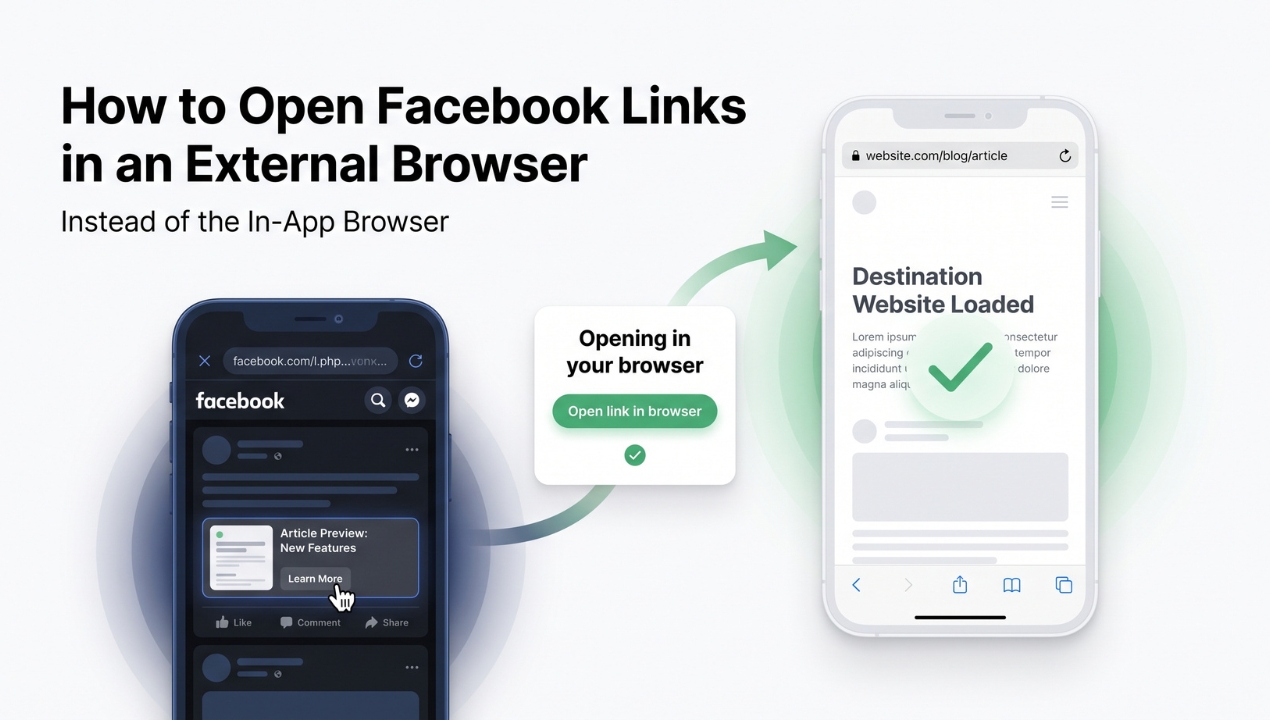
To open Facebook links in an external browser at scale, affiliates and performanclling users to tap “Open in external browser.” A browser-aware smart routing platform such as LinkDirect can help supported Facebook traffic continue in Safari, Chrome, or another native browser earlier in the conversion journey. This matters because an affiliate cookie created inside Facebook’s in-app browser may not be available when the same customer later returns to the merchant through their regular browser.

For affiliates, the issue is not simply where the landing page appears. It is whether the first click, tracking cookie, customer session, and eventual conversion remain connected. When these stages happen in separate browser environments, a later sale may not be attributed to the affiliate who generated the original interest.

Want to test this on your own traffic?

Start with one smart link and see how many visits reach the real device browser.

LinkDirect helps you route social traffic more cleanly, preserve tracking parameters, and measure who opens in the browser versus who stays inside the app.

This does not mean every Facebook in-app browser visit results in lost tracking. Attribution depends on the affiliate network, merchant configuration, tracking model, device, operating system, browser behavior, and whether the program uses server-side or account-based attribution. However, browser separation is a real risk that affiliates, agencies, media buyers, and brands should measure and reduce.

When someone taps a website link inside the Facebook mobile app, Facebook commonly opens the page in its own embedded browser. This can happen with links in posts, comments, groups, Pages, advertisements, profile sections, and other supported placements.

The in-app browser allows the user to visit a website without fully leaving Facebook. After viewing the page, the visitor can close the browser window and immediately return to the feed, group, post, or advertisement.

This creates a convenient experience for Facebook, but it may not create the best conversion environment for the advertiser or affiliate. The embedded browser can operate separately from Safari, Chrome, or another browser the user normally uses for shopping, comparing offers, accessing saved accounts, and completing payments.

Facebook also provides browser-related features such as link history, which can store information about websites visited through Facebook’s in-app browser. This further demonstrates that browsing inside Facebook is treated as its own environment rather than simply being another view of the user’s regular browser.

The exact behavior can differ by Facebook version, device, operating system, privacy settings, and destination website. Affiliates should therefore test real campaign flows instead of assuming that all mobile clicks behave identically.

How Facebook’s In-App Browser Can Affect Affiliate Cookies

Many affiliate programs use cookies to connect an initial referral with a later conversion. When a visitor clicks an affiliate URL, the merchant or affiliate network may place a cookie in the browser that received the click.

If the user completes a qualifying transaction within the attribution window, the program can use that cookie to identify the referring affiliate.

The problem is that browser cookies are generally connected to the browser environment in which they were created. A cookie created during a visit inside Facebook’s in-app browser may not automatically appear in Safari, Chrome, or another external browser.

Consider a customer who sees an affiliate post in a Facebook group and clicks a link to a travel offer, software subscription, online store, or financial product.

The merchant’s website opens inside Facebook’s browser. The affiliate network records the click, and an attribution cookie may be stored in that embedded browser environment.

The customer reviews the offer but does not purchase immediately. Later, they close Facebook, open Chrome or Safari, search for the merchant, and complete the transaction through the regular browser.

The external browser may not contain the affiliate cookie created during the original Facebook visit. If the affiliate program relies on that cookie to recognize the referral, the final transaction may not be credited to the partner who generated the original click.

The affiliate created demand and introduced the customer to the offer, but the conversion may appear as direct, organic, unattributed, or assigned to another channel.

Why Return Visits Matter

A large percentage of customers do not purchase during the first session. They may compare prices, read independent reviews, wait for payday, check cancellation conditions, discuss the purchase with another person, or return when they have more time.

This is especially relevant for offers with longer conversion paths, including:

  • travel bookings,

  • insurance and financial products,

  • software subscriptions,

  • electronics,

  • premium ecommerce,

  • online courses,

  • business services,

  • high-value lead generation.

In these categories, the value of an affiliate click is not limited to an immediate transaction. The first visit may influence a purchase that happens hours or days later.

If the first visit occurs inside Facebook but the return visit occurs in Safari or Chrome, cookie-based attribution can become fragmented.

It is important to describe this problem accurately. Facebook’s in-app browser does not automatically erase affiliate parameters or cause every commission to be lost.

Some affiliate programs use server-to-server tracking, account-level attribution, postback systems, coupon codes, conversion APIs, CRM matching, or other mechanisms that can supplement browser cookies.

A merchant may also reconnect a logged-in customer with an earlier marketing interaction.

The risk depends on the specific affiliate program and its tracking implementation. Affiliates often work with many different merchants and networks, however, and they cannot assume that every partner provides reliable cross-browser attribution.

Helping the initial visit take place in the browser the customer normally uses can therefore improve the chance of preserving cookie continuity.

How the Facebook Browser Can Affect Conversion Rates

Affiliate cookie separation is one of the most important concerns, but the Facebook in-app browser can affect other stages of the conversion journey as well.

Existing Login Sessions

A customer may already be logged in to the merchant’s website in Safari or Chrome. That active login may not be available inside Facebook’s browser.

The visitor may be required to enter a password, complete two-factor authentication, confirm an email address, or recover an account. These additional steps increase friction and can reduce the chance of completing a purchase or lead form.

Saved Carts and Previous Activity

Customers frequently return to saved baskets, wish lists, previous searches, account dashboards, or partially completed bookings.

If this information is connected to a cookie or session in the native browser, it may not be available when the website opens inside Facebook. The visitor can see an empty cart or a different account state, even though the expected information exists in Safari or Chrome.

This is particularly important for travel platforms, marketplaces, subscription services, and merchants with multi-step purchasing processes.

Checkout and Payment Flow

Payment methods and checkout systems can behave differently inside embedded browsers. Banking applications, mobile wallets, authentication screens, and app-to-app transitions may not always return the customer to the expected page.

The Facebook browser does not automatically break payments. However, it introduces another variable into a process where even a small amount of friction can lower conversion rates.

Merchant App Opening

Some affiliate destinations are configured to open the merchant’s mobile application when it is installed. Whether this happens depends on the merchant’s app-link setup, Facebook’s browser behavior, the operating system, the device, and the user’s settings.

An external browser may offer a more familiar route into the merchant’s app or allow the customer to continue on the website when app opening is unavailable.

Fragmented Analytics

Affiliate IDs and UTM parameters are not necessarily removed when a link opens inside Facebook. The original click can still appear correctly in an affiliate dashboard or analytics platform.

The measurement gap may appear later. The customer can move from Facebook to a merchant app, return through Chrome, or search for the offer in Safari. The initial click remains visible, but the final sale may appear in another session or channel.

For this reason, affiliates should evaluate more than clicks and landing page visits. Approved commissions, delayed conversions, browser opens, revenue per click, checkout completion, and lead quality provide a more complete view of campaign performance.

Facebook users can usually open a website inside the application, tap the options menu, and choose “Open in external browser.” Depending on the device and browser configuration, the page may then open in Safari, Chrome, or another selected browser.

Users can also copy the destination URL and paste it into their preferred browser.

Changing the default browser on iOS or Android determines which browser handles links passed to the operating system. It does not necessarily force every link clicked inside Facebook to bypass Facebook’s embedded browser immediately.

These manual options may help an individual user, but they are not a scalable conversion strategy.

An affiliate cannot assume that every visitor will understand why the external browser matters. Most users will not search through browser menus or copy and paste a URL before evaluating an offer.

Every additional instruction creates more friction. For paid traffic and large affiliate audiences, relying on manual behavior can reduce the value of the campaign.

Want to test this on your own traffic?

Start with one smart link and see how many visits reach the real device browser.

LinkDirect helps you route social traffic more cleanly, preserve tracking parameters, and measure who opens in the browser versus who stays inside the app.

Affiliates and performance marketers need a campaign-level solution that does not depend on every user finding the correct Facebook setting.

A browser-aware smart link can recognize that a visitor is opening the destination from an embedded social browser. It can then attempt to guide the user toward the best available opening method.

When supported, the flow helps move the visitor into the external browser. If direct opening is unavailable, the user receives a conversion-friendly fallback that allows them to continue to the destination.

The routing process should preserve the original affiliate URL, UTM parameters, campaign identifiers, and other tracking values. It should also avoid making absolute promises because the final result depends on Facebook, the operating system, device configuration, browser settings, and user actions.

How LinkDirect Helps Facebook Affiliate Traffic

LinkDirect is a paid subscription SaaS for affiliates, performance marketers, agencies, brands, media buyers, funnel owners, and creators who monetize social traffic.

It is not designed as a consumer utility for individual Facebook users. LinkDirect helps professionals optimize traffic coming from Facebook, Instagram, Messenger, TikTok, and other social applications where embedded browsers can affect attribution and conversion flow.

The platform uses browser-aware smart routing, environment detection, a native-open flow, attribution-safe redirects, and a conversion-friendly fallback. It attempts to guide supported users toward the best available destination without claiming that every click will always open externally.

A LinkDirect subscriber can create a smart link that points to an existing affiliate offer, landing page, ecommerce product, booking website, lead form, sales funnel, or checkout.

The smart link can be placed in Facebook posts, comments, groups, Pages, advertisements, messages, and other campaign placements where clickable links are supported.

When the user clicks the LinkDirect URL, the platform detects the environment and attempts to guide the visitor toward the device’s external browser.

When direct external opening is unavailable, LinkDirect presents an appropriate fallback so the user can still continue to the destination instead of reaching a dead end.

The original destination and campaign parameters can be preserved, including affiliate IDs, UTM parameters, click identifiers, and other values required for tracking.

The central benefit for affiliates is that the first merchant visit has a better chance of happening in the browser the customer is likely to use again.

If the affiliate cookie is created in Safari or Chrome rather than only inside Facebook’s browser, the same cookie may still be available when the customer later returns through that native browser.

This does not guarantee attribution because every affiliate program uses its own tracking rules. However, it can reduce one common source of cookie and session separation.

LinkDirect Site Scripts

Marketers who control their own websites can also use LinkDirect site scripts.

A lightweight script is added to the head section of the website. It helps identify supported visits arriving from in-app browsers and guides those visitors through the LinkDirect transition flow.

This approach can work even when the original campaign did not use a LinkDirect smart link.

Site scripts are useful for agencies, brands, publishers, and funnel owners that receive Facebook traffic from many posts, creators, advertisements, and external campaign partners.

Smart links optimize individual URLs. Site scripts help apply social traffic optimization more broadly across an owned website.

Branded Custom Subdomains

LinkDirect subscribers can use their own subdomains for smart links. This provides a consistent, recognizable link structure across Facebook posts, groups, advertisements, creator campaigns, and private communities.

A branded subdomain can make the transition feel more connected to the campaign than an unfamiliar generic redirect URL.

It can also help agencies and affiliates organize multiple campaigns while maintaining control over their link branding.
Measuring Facebook In-App Browser Traffic with LinkDirect

LinkDirect provides analytics that help subscribers understand how users move through the click flow.

Available data can include:

  • total clicks,

  • browser opens,

  • users who stayed inside the application,

  • traffic sources,

  • devices,

  • operating systems,

  • countries,

  • live click flow.

This information can be compared with affiliate network reports, merchant analytics, CRM data, approved commissions, conversion rates, and revenue per click.

The goal is not to assume that every Facebook in-app browser visit represents a lost sale. The goal is to measure how much traffic remains in the embedded environment and determine whether external-browser routing improves the value of that traffic.

Create separate smart links for different placements. Facebook groups, Page posts, comments, paid advertisements, and direct messages may produce different behavior and should be tracked independently.

Preserve affiliate identifiers, click IDs, UTM parameters, campaign names, and placement values. External-browser routing should support your existing tracking system rather than replace it.

Test the complete journey on iOS and Android. Confirm that the destination loads, tracking parameters remain present, cookies are created, account logins work, and checkout can be completed.

Analyze delayed conversions as well as purchases completed during the initial visit. This is especially important for travel, finance, software, and other offers with longer decision cycles.

Use branded subdomains to create a consistent campaign experience and increase trust around the transition.

Compare performance before and after introducing LinkDirect. Review browser opens, conversion rates, approved commissions, revenue per click, lead quality, and the percentage of visitors who remain inside Facebook.

Why External Browser Routing Matters for Facebook Affiliates

Opening Facebook links in an external browser is not simply a convenience feature. For affiliates and performance marketers, it can be an attribution and conversion optimization strategy.

When the affiliate cookie is stored only in Facebook’s embedded browser, a customer who later returns through Safari or Chrome may complete the purchase without the original referral cookie being available.

LinkDirect helps reduce that risk by attempting to move supported Facebook traffic into the customer’s regular browser earlier in the conversion journey.

Through smart links, site scripts, branded subdomains, browser-open analytics, attribution-safe redirects, and conversion-friendly fallbacks, LinkDirect gives professional marketers more control over how Facebook clicks reach the final offer.

Create a LinkDirect smart link and help your Facebook traffic open where it should.

Topics

Author

LinkDirect Editorial Team

Editorial team

5 articles

The LinkDirect editorial team writes about smart redirects, in-app browsers, attribution recovery, and mobile-first conversion flows.

FAQ

Frequently asked questions

Why does Facebook open affiliate links in an in-app browser?

Facebook commonly opens website links in its embedded browser so users can view pages without fully leaving the application. For affiliates, this can place the first visit, cookie, and session in a different environment from Safari or Chrome.

Can Facebook’s in-app browser affect affiliate cookies?

Yes. An affiliate cookie may be stored in Facebook’s embedded browser context. If the customer later returns through Safari or Chrome, that external browser may not contain the same cookie, potentially affecting attribution in cookie-based programs.

Does every Facebook in-app browser click cause a lost commission?

No. The outcome depends on the affiliate program, tracking method, merchant implementation, device, browser, and whether server-side or account-based attribution is used. The browser creates a potential attribution risk rather than a guaranteed loss.

Can Facebook users manually open a link in an external browser?

Facebook provides an “Open in external browser” option in the menu of its in-app browser. However, requiring every visitor to select this option manually is not a scalable solution for affiliates or paid traffic campaigns.

How can affiliates make Facebook links open externally?

Affiliates can use a browser-aware smart routing platform such as LinkDirect. It attempts to guide supported users toward their external browser and provides a fallback when direct opening is unavailable.

Does LinkDirect preserve affiliate IDs and UTM parameters?

LinkDirect is designed to preserve the original destination and relevant campaign parameters, including affiliate identifiers and UTMs. Each destination and affiliate program should still be tested before scaling traffic.

What is the difference between LinkDirect smart links and site scripts?

Smart links optimize individual campaign URLs, while site scripts help manage supported in-app browser traffic reaching a website controlled by the marketer. Both features are available through a paid LinkDirect subscription.

Ready to test it?

Recover more social traffic before it gets stuck inside in-app browsers.

Create smart links, add your own domain, measure browser opens, and see exactly how much traffic stays inside Instagram or Facebook before conversions disappear.