Cookies

Your privacy, clearly explained

We use cookies to keep LinkDirect secure, improve performance, and understand how people use the product.

Back to blog

Facebook In-App Browser Affiliate Tracking Problems: How to Prevent Lost Commissions

Facebook’s in-app browser can store affiliate cookies in a separate environment from Safari or Chrome. Learn why this can lead to lost commissions and how LinkDirect helps affiliates reduce attribution risk from Facebook traffic.

Facebook In-App Browser Affiliate Tracking Problems: How to Prevent Lost Commissions
Published:July 8, 2026Updated:July 8, 2026Reading time:14 min read

Table of contents

Expand or collapse article sections

Facebook In-App Browser Affiliate Tracking Problems

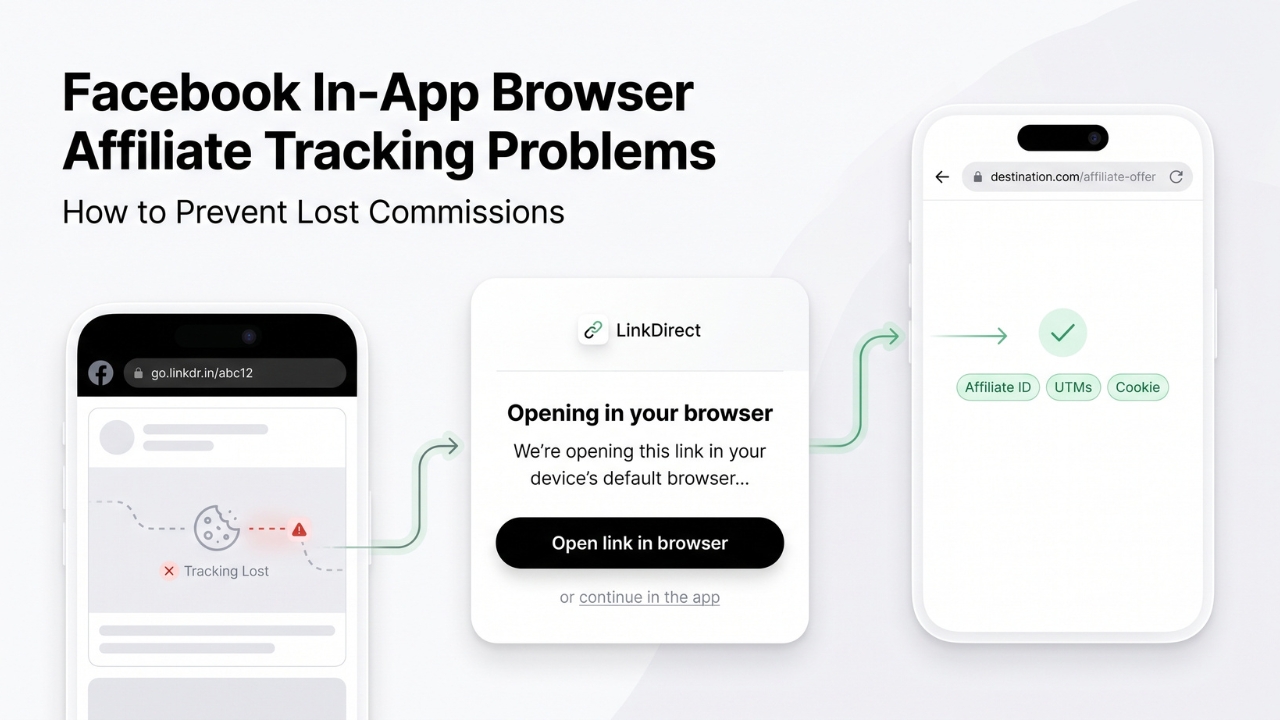
Facebook in-app browser affiliate tracking problems usually happen when the first affiliate click opens inside Facebook’s embedded browser, but the customer later returns to the merchant through Safari, Chrome, or another external browser. If the affiliate cookie was created only inside Facebook’s browser environment, the later purchase may not carry the same cookie. In cookie-based affiliate programs, this can lead to lost or unattributed commissions.

This does not mean every Facebook click loses attribution. The result depends on the affiliate network, merchant setup, tracking model, device, browser behavior, cookie policy, and whether the program uses server-side or account-based attribution. However, for affiliates, agencies, media buyers, creators, and performance marketers, Facebook’s in-app browser is a real conversion-risk area that should be measured and reduced.

Want to test this on your own traffic?

Start with one smart link and see how many visits reach the real device browser.

LinkDirect helps you route social traffic more cleanly, preserve tracking parameters, and measure who opens in the browser versus who stays inside the app.

What Is the Facebook In-App Browser?

The Facebook in-app browser is the embedded browser that opens when someone taps a website link inside the Facebook mobile app. Instead of immediately sending the user to Safari, Chrome, or another default browser, Facebook can load the page inside its own app-controlled browsing window.

This can happen when users click links in posts, comments, groups, Pages, ads, private conversations, and other Facebook placements.

For Facebook users, the experience is convenient. They can open a page, close it, and return directly to the feed, group, ad, or post they came from. For affiliates and performance marketers, however, the situation is more complex.

The in-app browser may not share the same cookies, sessions, login status, saved carts, or browsing state as the customer’s regular browser. This can affect how affiliate tracking behaves across the full customer journey.

Why Facebook In-App Browser Affiliate Tracking Problems Happen

Affiliate tracking is not only about recording the first click. It is about connecting that click with a later conversion.

Many affiliate programs use cookies as part of that process. When a user clicks an affiliate link, the merchant or affiliate network may store a cookie in the browser. If the user later completes a qualifying purchase during the attribution window, that cookie can help identify the affiliate responsible for the referral.

The problem starts when the cookie is created inside Facebook’s embedded browser, while the final purchase happens somewhere else.

Imagine a user sees your affiliate post in a Facebook group. They click your link and the merchant website opens inside Facebook’s in-app browser.

The affiliate network records the click, and a cookie may be stored in that browser environment.

The user checks the product, compares the price, and closes the page without buying. Later that evening, they open Chrome, search for the same merchant, and complete the purchase.

Chrome may not contain the cookie that was stored inside Facebook’s browser. If the affiliate program depends on that cookie, the final sale may not be attributed to you.

You generated the demand, but the transaction may appear as direct traffic, organic traffic, branded search, unattributed traffic, or another channel.

Delayed Purchases Increase the Risk

This matters because many customers do not buy during the first session.

They may compare offers, read reviews, wait for payday, check shipping conditions, ask another person, or return when they have more time. In affiliate marketing, this delayed decision process is normal.

The risk is especially important for offers such as:

  • travel bookings,

  • financial products,

  • insurance,

  • software subscriptions,

  • electronics,

  • premium ecommerce,

  • online courses,

  • B2B lead generation,

  • high-value consumer products.

The more time passes between the first click and the final purchase, the more likely it is that the customer returns through a different browser or device.

If the original affiliate cookie remains isolated inside Facebook’s in-app browser, cookie-based attribution may break before the conversion happens.

Not Every Program Loses Attribution

It is important to be precise. Facebook’s in-app browser does not automatically remove every affiliate parameter or destroy every tracking cookie.

Some affiliate programs use server-side tracking, postbacks, logged-in account attribution, coupon attribution, conversion APIs, CRM matching, or other systems that can support attribution beyond browser cookies.

Some merchants may also reconnect sessions through their own first-party systems.

However, affiliates often work with many merchants, networks, and tracking setups. You cannot assume every advertiser has perfect cross-browser attribution. If a program relies heavily on browser cookies, Facebook’s in-app browser can become a weak point in the funnel.

How the Facebook In-App Browser Can Reduce Conversions

Lost commission is not the only issue. The Facebook in-app browser can also reduce conversion performance by increasing friction.

Different Login Sessions

A customer may already be logged in to a merchant account in Safari or Chrome. When the same merchant opens inside Facebook’s browser, that login session may not be available.

The user may need to sign in again, complete two-factor authentication, confirm an email address, or reset a password. Every additional step can reduce the chance of completing the purchase.

Missing Saved Carts and Search History

Many customers rely on saved carts, wish lists, previous searches, booking details, or account preferences.

Those sessions may exist in the regular browser but not inside Facebook’s embedded browser. A customer may click your affiliate link and see a different state from the one they expected.

This can be especially damaging for travel, ecommerce, marketplaces, subscription products, and platforms where users compare options before converting.

Checkout and Payment Friction

Payment systems, banking apps, mobile wallets, and verification steps may behave differently inside embedded browsers.

The Facebook in-app browser does not automatically break checkout. However, it can add another layer of complexity to a process where every extra step matters.

A customer who encounters payment friction may abandon the purchase and return later through a normal browser. If that later session does not contain your affiliate cookie, the conversion may be lost from your affiliate reporting.

App Opening Problems

Some affiliate links are intended to open a merchant’s mobile app when installed. Whether this happens depends on the merchant’s app-link configuration, device settings, operating system, and Facebook’s browser behavior.

If the app handoff does not work smoothly, the customer may continue in the in-app browser, return later through another browser, or search for the merchant manually.

For affiliates, the key issue is consistency. The more fragmented the path becomes, the harder it is to preserve attribution and user intent.

Why Manual “Open in External Browser” Is Not Enough

Facebook users can often tap the browser menu and choose an option such as “Open in external browser.” Depending on the device, this may open the page in Safari, Chrome, or another browser.

This option may help an individual user, but it is not a reliable affiliate marketing strategy.

Most users do not know why the browser environment matters. They will not look for a hidden menu, copy a link, or manually move the page into another browser before deciding whether to buy.

Manual instructions also add friction. If your campaign needs a paragraph explaining how to open the link correctly, the offer is already less direct than it should be.

Affiliates and performance marketers need a solution that works at the link or website level, not a process that depends on every visitor changing their behavior.

Want to test this on your own traffic?

Start with one smart link and see how many visits reach the real device browser.

LinkDirect helps you route social traffic more cleanly, preserve tracking parameters, and measure who opens in the browser versus who stays inside the app.

How to Prevent Lost Commissions from Facebook In-App Browser Traffic

Preventing lost commissions starts with reducing the gap between the first affiliate click and the browser environment where the customer is likely to return later.

The goal is not to force a specific result in every case. Social apps, mobile operating systems, device settings, and browser rules can limit what is possible. The goal is to guide supported users toward a better destination and preserve tracking values through the process.

Route Supported Users Toward the External Browser

A browser-aware smart routing layer can identify when a click comes from Facebook’s in-app browser and attempt to move the user toward the best available external browser experience.

If the user can continue in Safari, Chrome, or another default browser, the first merchant visit has a better chance of happening in the same browser the customer may use later.

This can improve cookie continuity in programs that rely on browser-based attribution.

Preserve Affiliate IDs and Campaign Parameters

Any solution used for affiliate traffic must preserve the original destination and tracking parameters.

That includes:

  • affiliate IDs,

  • click IDs,

  • sub IDs,

  • UTM parameters,

  • campaign names,

  • placement values,

  • source identifiers,

  • network-specific tracking values.

A routing layer that strips or changes tracking parameters can create a new attribution problem. The objective is to improve the browser path without damaging the campaign data.

Use a Fallback When External Opening Is Unavailable

Not every click can be moved directly into an external browser. The result depends on Facebook, the user’s device, operating system, app version, default browser, and platform restrictions.

This is why a conversion-friendly fallback matters. When direct external opening is unavailable, the user should still have a clear way to continue to the destination.

A dead end is worse than an in-app browser. The fallback should keep the campaign moving.

How LinkDirect Helps Prevent Facebook Affiliate Tracking Problems

LinkDirect is a paid subscription SaaS for affiliates, performance marketers, agencies, brands, media buyers, funnel owners, and creators who monetize social traffic.

It is built for professionals who send traffic from Facebook, Instagram, Messenger, TikTok, and other social platforms where in-app browsers can affect cookies, attribution, and conversion flow.

LinkDirect helps route supported Facebook traffic toward the user’s external browser earlier in the journey. It uses browser-aware smart routing, environment detection, a native-open flow, attribution-safe redirects, and a conversion-friendly fallback.

LinkDirect does not guarantee that every click will open outside Facebook. No responsible tool should promise that. Platform behavior depends on Facebook, mobile operating systems, application versions, user settings, device configuration, and destination setup.

Instead, LinkDirect helps guide each supported click toward the best available path.

With LinkDirect, subscribers can create smart links for affiliate offers, ecommerce pages, booking websites, lead forms, landing pages, checkout pages, and sales funnels.

A LinkDirect smart link can be used in Facebook posts, groups, Pages, comments, ads, private communities, and direct-message campaigns.

When a visitor clicks the smart link inside Facebook, LinkDirect identifies the environment and attempts to guide the user toward the external browser when supported.

The original destination and campaign parameters are preserved, including affiliate IDs, UTM values, click identifiers, and other tracking data.

The main affiliate benefit is cookie continuity.

If the first merchant visit happens in Safari or Chrome instead of only inside Facebook’s embedded browser, the affiliate cookie may be available when the customer later returns through the same browser.

This can reduce the risk of losing delayed purchases that were originally influenced by your Facebook traffic.

It does not guarantee commission approval. The merchant’s affiliate program, attribution rules, cookie duration, validation process, and tracking implementation still matter. But it removes one common source of browser-environment separation.

LinkDirect Site Scripts

For marketers who control their own websites, LinkDirect also provides site scripts.

A lightweight script can be added to the head section of a website. It helps detect supported visits coming from in-app browsers and guides those visitors through the LinkDirect transition flow.

This can be useful when traffic arrives from many Facebook posts, creators, ads, or organic placements, even if every individual link was not created as a smart link.

Smart links optimize specific campaign URLs. Site scripts help optimize a broader share of traffic reaching an owned domain.

Custom Subdomains

LinkDirect subscribers can also use custom subdomains for their smart links.

This helps agencies, affiliates, and brands keep a consistent link structure across Facebook campaigns. A branded subdomain can increase trust and make the transition feel connected to the campaign rather than like a random redirect.

For professional campaigns, trust matters. Users are more likely to continue when the link experience feels clean, branded, and intentional.
Measuring Facebook In-App Browser Impact

One of the biggest mistakes affiliates make is assuming they understand the problem without measuring it.

LinkDirect helps subscribers analyze the click flow with metrics such as:

  • total clicks,

  • browser opens,

  • users who stayed inside the app,

  • traffic sources,

  • devices,

  • operating systems,

  • countries,

  • live click flow.

These metrics can be compared with affiliate network data, merchant reports, analytics platforms, conversion rate, approved commissions, rejected commissions, and revenue per click.

The goal is not to claim every Facebook in-app browser visit is lost. The goal is to understand what percentage of your traffic remains in the embedded browser and whether improving browser opens leads to better affiliate performance.

Create separate smart links for different Facebook placements. Group posts, Page posts, ads, comments, private communities, and messages may produce different user behavior.

Use clear campaign parameters. Separate your UTM values, sub IDs, and placement identifiers so you can understand which sources produce valuable traffic.

Test the full journey on iOS and Android. Do not only check whether the page loads. Test cookie creation, login behavior, checkout, app opening, and final attribution.

Analyze delayed conversions. If your offer has a longer decision cycle, the first session may not be where most revenue happens.

Use branded subdomains when trust matters. A clean link structure can improve campaign consistency.

Compare before and after data. Review browser opens, users staying inside Facebook, conversion rate, approved commissions, revenue per click, and lead quality.

Why Facebook In-App Browser Tracking Problems Matter

Facebook in-app browser affiliate tracking problems are not just technical details. They can affect whether the affiliate who generated the click receives credit for the sale.

When a cookie is created inside Facebook’s embedded browser and the customer later purchases through Safari or Chrome, the original referral may not be available in the final browser session.

For affiliates, this can mean lost revenue from traffic they actually influenced.

LinkDirect helps reduce this risk by attempting to move supported Facebook traffic toward the external browser earlier in the journey, while preserving the original destination and tracking parameters.

With smart links, site scripts, custom subdomains, analytics, attribution-safe redirects, and conversion-friendly fallbacks, LinkDirect gives professional marketers more control over how Facebook clicks reach the final offer.

Create a LinkDirect smart link and help your Facebook affiliate traffic open where it should.

Topics

Author

LinkDirect Editorial Team

Editorial team

5 articles

The LinkDirect editorial team writes about smart redirects, in-app browsers, attribution recovery, and mobile-first conversion flows.

FAQ

Frequently asked questions

What are Facebook in-app browser affiliate tracking problems?

They are tracking issues that can happen when an affiliate click opens inside Facebook’s embedded browser, but the customer later returns through Safari, Chrome, or another external browser. If the original affiliate cookie is not available in the later browser session, attribution may be affected.

Can Facebook’s in-app browser cause lost affiliate commissions?

It can contribute to lost or unattributed commissions in cookie-based programs. This depends on the affiliate network, merchant setup, tracking model, device, browser behavior, and whether other attribution methods are used.

Does Facebook remove affiliate cookies?

Not necessarily. The more accurate issue is cookie separation. A cookie may be stored inside Facebook’s in-app browser environment and may not be available when the customer later returns through a native browser.

How can affiliates prevent lost commissions from Facebook traffic?

Affiliates can reduce risk by using browser-aware smart links, preserving all tracking parameters, testing the full user journey, and routing supported users toward the external browser earlier in the journey.

How does LinkDirect help with Facebook affiliate tracking?

LinkDirect attempts to move supported Facebook traffic from the in-app browser toward the user’s external browser while preserving affiliate IDs, UTM parameters, and the original destination. It also provides a fallback when direct external opening is unavailable.

Does LinkDirect guarantee every Facebook link opens externally?

No. The final behavior depends on Facebook, the user’s device, operating system, browser settings, app version, and destination configuration. LinkDirect guides supported users toward the best available path.

Is LinkDirect for regular Facebook users?

No. LinkDirect is a paid subscription SaaS for affiliates, performance marketers, agencies, brands, media buyers, funnel owners, and creators who monetize social traffic.

Ready to test it?

Recover more social traffic before it gets stuck inside in-app browsers.

Create smart links, add your own domain, measure browser opens, and see exactly how much traffic stays inside Instagram or Facebook before conversions disappear.